Offline Wikipedia
Jump to navigation
Jump to search
License: Creative Commons Attribution-ShareAlike 3.0 Unported License,GNU Free Documentation License
Offline Wikipedia
There are 2 versions of offline wikipedia:
1. 2010 wikipedia with images - contains only 45000 articles
2. 2012 wikipedia without images - contains all articles as of Jan 2012
Offline Wikipedia Setup
1. Follow these steps ONLY if you are reconstructing the computer lab. Otherwise use the kiwix automated script to add new wikipedia zim file to the library
2. Perform all install steps from Kiwix
3. Copy the following folders from the <external harddisk> to C:\Wiki Content
- folder: wikipedia_en_all_nopic_01_2012
- folder: wikipedia_en_wp1_0.8_45000+_12_2010
Usage
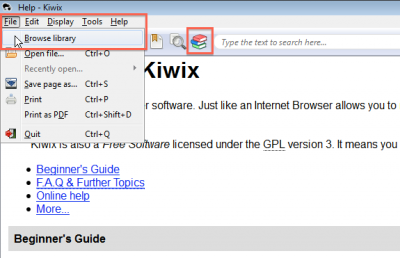
1. Browse library

2 ways to load libraries
- Click on File -> Browse library
- Click on the books icon
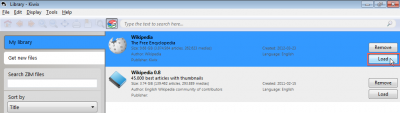
2. Select a library

- Select the library you want to look at.
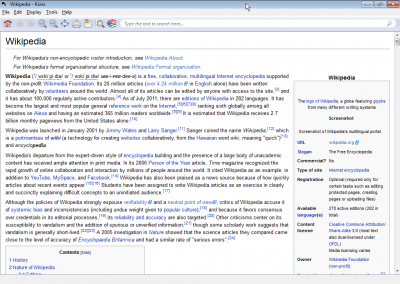
3. Library is displayed

- Wikipedia without pictures is displayed
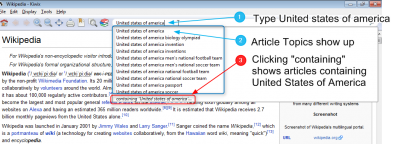
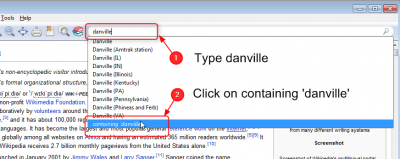
4. Search for a topic

Search box shows 2 types of results
- Articles topics
- Any articles containing the search word
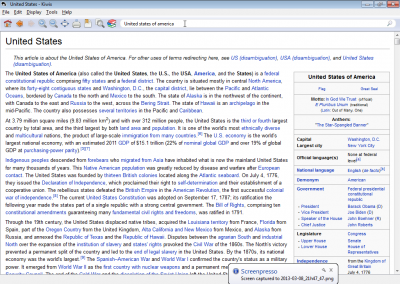
5. Article Topic page is shown

- Wiki page "United States of America" is shown
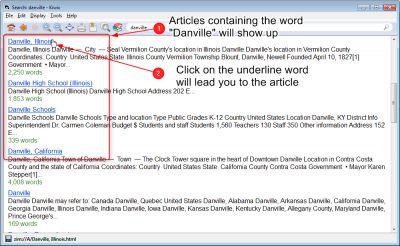
6. Search for articles containing a specific word

- Type Danville

- A list of articles that contain the search word

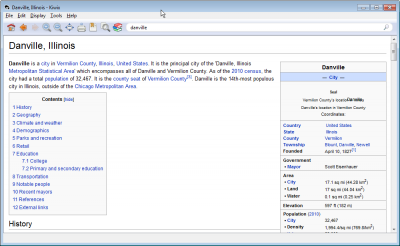
- Clicking on any link (underline words) will lead you to the article