BIOS Boot settings
Jump to navigation
Jump to search

Goals
Set Internal USB Drivekeys to boot before externals ones
This is done as a security precaution. As long as the bootable EJP Recovery Drive is inserted internally, we can never accidentally boot from an external USB drive. This also protects from boot sector virus contamination too.
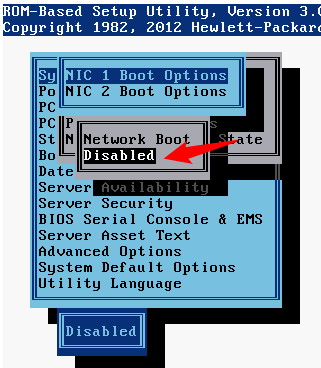
Disable Network booting
Theoretically a Network PXE boot could be an attack surface. In our case that is not to worrisome. What we do care about is not waiting for two PXE boot failures before moving on.
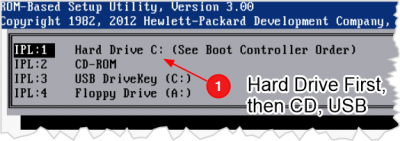
Set Hard drive to boot first
- Booting the hard drive first means that we don't accidentally boot from removable media
- This setting allows our bootable EJP Recovery Drive to remain inserted persistently, without booting from it as long as the hard drive is booting.
- The only way to boot from the internal USB is to delibrately press the F11 key at boot time and choose to boot from USB.
Procedures
Enter the main BIOS screen
.png)
.png)
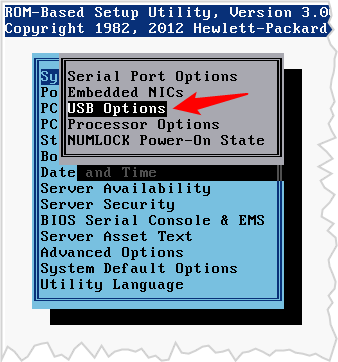
- While System Options is highlighted, press Enter
- Highlight USB Options, press Enter
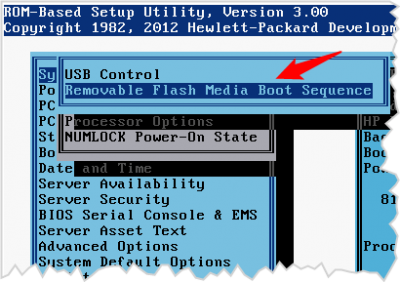
- Highlight Removeable Flash Media Boot Sequence, press Enter
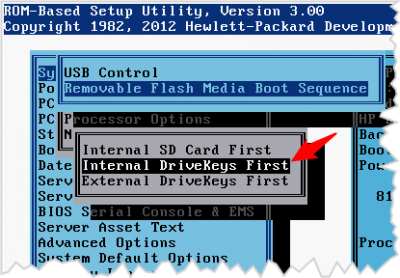
Select Internal First
.png)
- Select Internal DriveKeys First
- Press Enter
- Press ESC to return to the previous menus
.png)
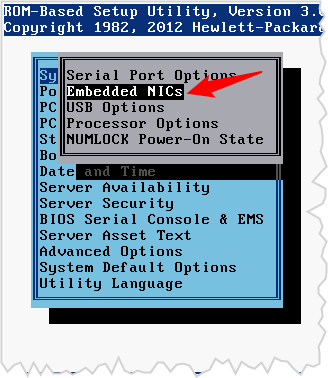
- System Options
- Embedded NICs
.png)
- There will be a warning message that you can ignore...
.png)
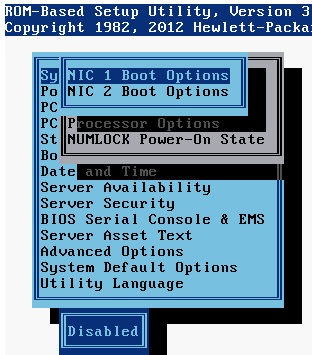
- NIC 1 Boot options
Disable NIC Boot for both interfaces
.png)
- Select Disabled
- Repeat that process for NIC 2
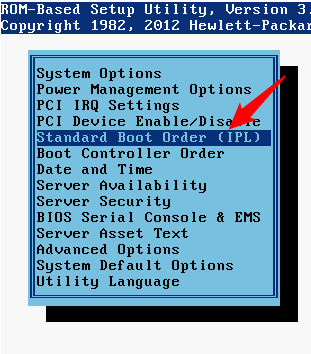
Select Standard Boot Order
.png)
- On the main menu select Standard Boot Order
Rearrange the Boot order
.png)
- If the NIC boot was still enabled, the NICs would appear here, but you can ignore them
- Arrange the order like so:
- Hard Drive
- CD-ROM
- USB DriveKeys
- The Floppy doesn't matter as there isn't one.