Entering the BIOS Setup
Jump to navigation
Jump to search
Goals
Enter the system BIOS to change or inspect the config
The BIOS lets you configure some of the basic settings for the computer. Entering the BIOS settings lets you change or inspect those settings
Procedures
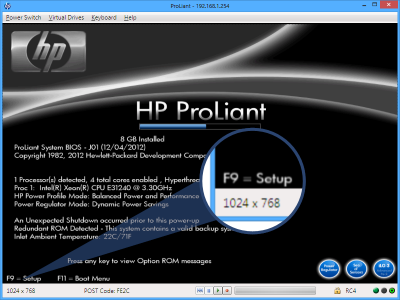
Power cycle the Machine, Observe the Logo screen
.png)
- When you first turn on the computer you should see the Logo screen
- At the bottom is says you can do the following:
- Press F9 for the Setup
- Press F11 for one time boot menu
- There is also a hidden option, Press F8 to reach the Configure HP Integrated Lights Out
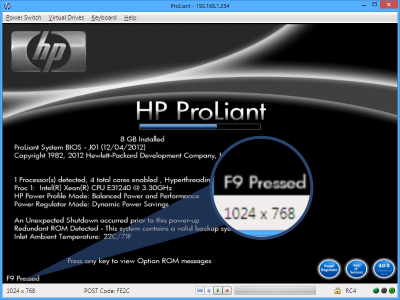
Observe entering setup
.png)
- After pressing the F9 button you should see the text change to F9 Pressed
Wait for POST to complete
- It will be some time yet before you get to the BIOS setup.
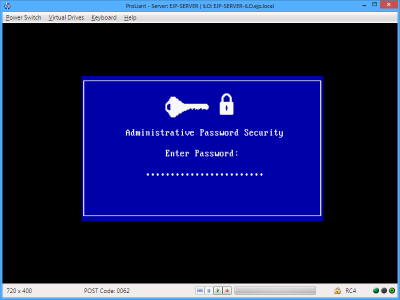
Enter the Admin password
.png)
- If the password has been set already, then enter the First 7 characters of the administrator password
- Note that it looks like it will accept a longer password, but it only takes 7 characters
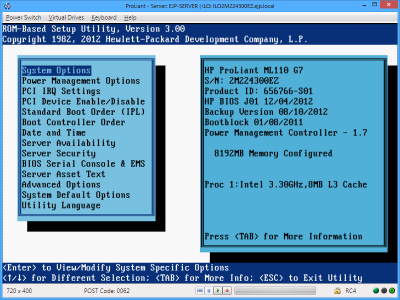
Observe the BIOS Main Menu
.png)
- You should now see the main BIOS screen, and proceed with other tasks