Windows Misc Config
Jump to navigation
Jump to search

Goals
Set the time
- Be sure you do BIOS Set time before this step, otherwise it will get confused if it changes later
Set domain name
- The DNS services will complain if the server's domain doesn't match
Procedures
Open the Time/Date settings

- Right click on the clock in the system tray
- Set time and time zone as appropriate
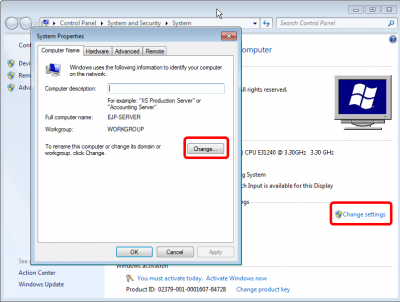
Open System properties

- Right click on computer and select Properties
- On the System Panel, select Change settings
- On the System Properties select Change
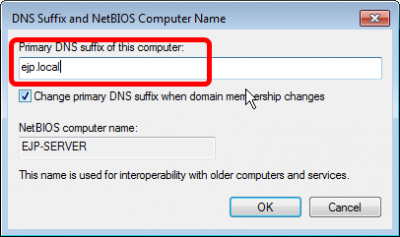
Set DNS Suffix

- Specify ejp.local as the DNS suffix