Unload NComputing Filter driver
Jump to navigation
Jump to search
Goals
Perform a Disk operation such adding a Dedicated Backup
There are some operations, namely attaching a dedicated backup drive that do not work when the NComputing vSpace server is installed.
.png)
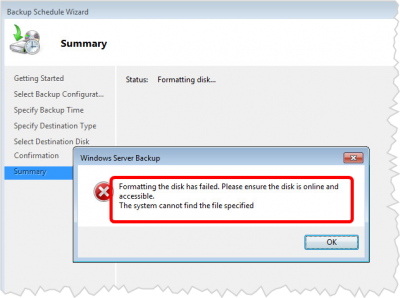
- Windows Server Backup Complains that the disk went missing after reinitializing and attempting to start formatting
.png)
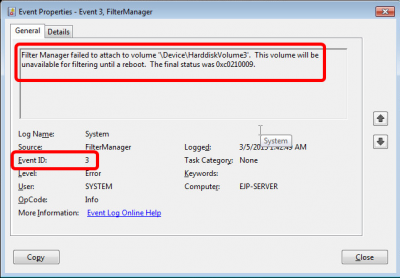
- Event Viewer reports errors such as
- Event ID 3
- Filter Manager Failed to attach Volume
Procedures
Observe that the Filter Driver is Loaded
.png)
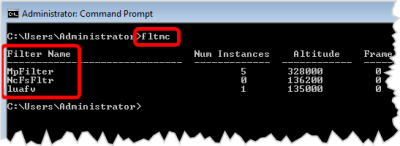
- Open Command Prompt as Administrator
- Enter the command:
fltmc
- Observe that there are 2 or 3 entries
MpFilter- The Microsoft Security Essentials filesystem driver- NcFsfltr - The Ncomputing Filter driver
luafv- User Account control filter
We want to unload the Ncomputing one...
Unload he NcFsFltr driver
.png)
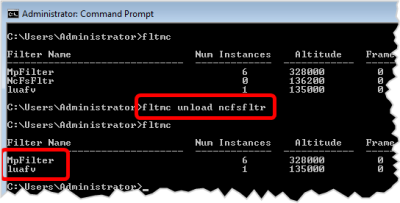
- Enter the command
fltmc unload ncfsfltr
- Enter the command
fltmcagain - Observe that the Ncomputer driver is now gone
Perform your disk operations
Now you can add your dedicated backup disk, and Windows Server Backup will not compain while attempting to format it
Load the Filter driver or reboot
- After you are done formatting you backup disk, or other operations, you can reload the filter driver, or just restart the computer
- The reload command is
fltmc load ncfsfltr