MSConfig
Jump to navigation
Jump to search

Goals
MSconfig is a usefull too for keeping track of what applications and services are starting up each time you boot the computer and start Windows. You can use this tool to Disable startup items in a fairly safe way. If you later learn that you wanted to keep the item, you can go back and re-enable it.
Remove an Item from Startup
There are at least to startup items that We know we want to remove so we'll use those as an illustration
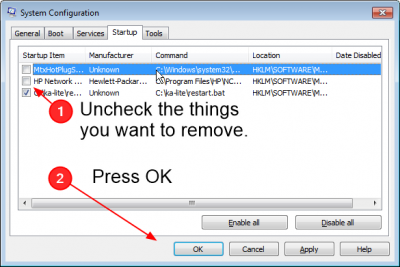
- MTXHotplugServerce - This is a feature of the Matrox Video card that is installed in the server. Since we really don't care about it, we can disable it
- HP NIC Teaming UI - This is the program that adds the NIC teaming icons in the system tray that give you quick access to the teaming settings. This is not needed for regular operation.
Procedures
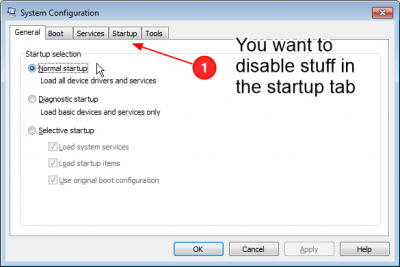
Start MSconfig

- Open the Run Dialog
- Type msconfig
Select the Startup tab

- There are several tabs here which you can explore at your convenience
- Settings won't change unless you press Apply or OK so if you accidently change something, just select Cancel
Disable the unwanted applications

- On this page unselect the items you want to disable
MTXHotPlugService.exe- HP Network Config Utility (cpqteam.exe)
- When you are done, press Apply or OK
- These changes can be reversed by coming back here and selecting them again
- The underlying applications will remain