L300 Firmware Upgrade
Jump to navigation
Jump to search
Goals
Upgrade the NComputing L300 clients to the latest version
It is not uncommon for embedded devices like this to have some basic version of the firmware installed when you receive a unit from the factory. There is an expectation that the user will apply any software updates to the devices before putting them into production use.
Procedures
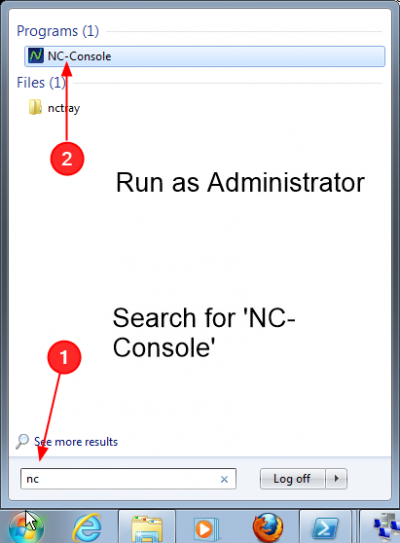
Start the Ncomputing Management Console

- In the Start Menu search for NC-Console
- Right-click and Run as Administrator
- Alternatively, if you already started the Multipoint Manager, you can select the Ncomputing tab, and open the NComputing Management Console from there
Observe There are Some Out-of-Date clients
.png)
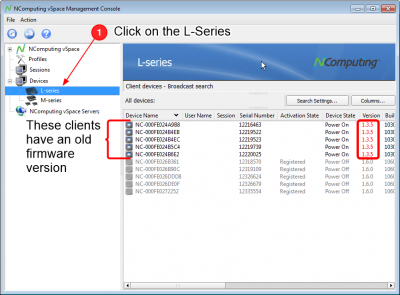
- Click on the Devices->L-series item in the left pane
- The new clients may not have come from the factory with the latest software version
- The ones with old versions will be reported here
Initiate the Firmware Upgrade
.png)
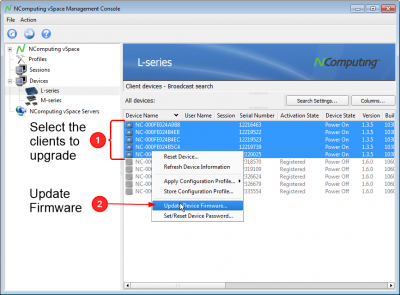
- Select the clients you want to upgrade. (You can use the Shift and Ctrl keys to help you select more than one)
- Once the selections are made, Right-click on a selected item
- Choose Upgrade Device Firmware
Select the Latest version
.png)
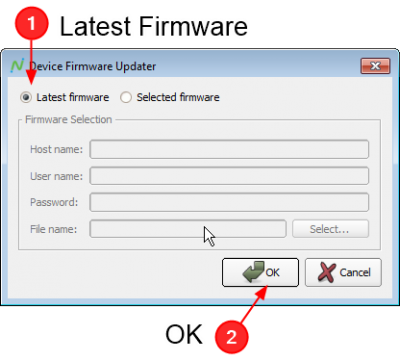
- When prompt select the Latest Version
- Click OK
Wait for Upgrade to complete
- You should observe that the L300 clients display messages about performing the upgrade
- When they are complete, they will reboot into the new version
- This operation should be complete in about 3 minutes
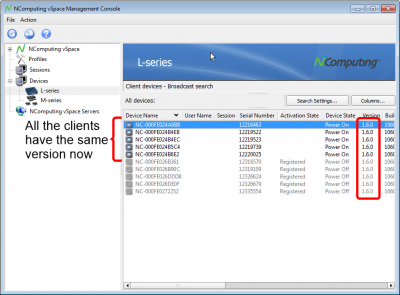
Observe the New Clients are Upgraded
.png)
- You should see the new version reported when those client power back on
- You may want to attempt to start sessions with them, if they are not showing up here